
Give your videos a table of contents
See a moment worth keeping? Right-click and bookmark it. VtfPlayer saves the picture of that frame, not just a timestamp. Your bookmarks become the contents page of that video — click one and playback jumps straight back.
Bookmarks are a tab bar for your video
Right-click the picture, choose “Bookmark this frame”, and it appears in the panel on the right.
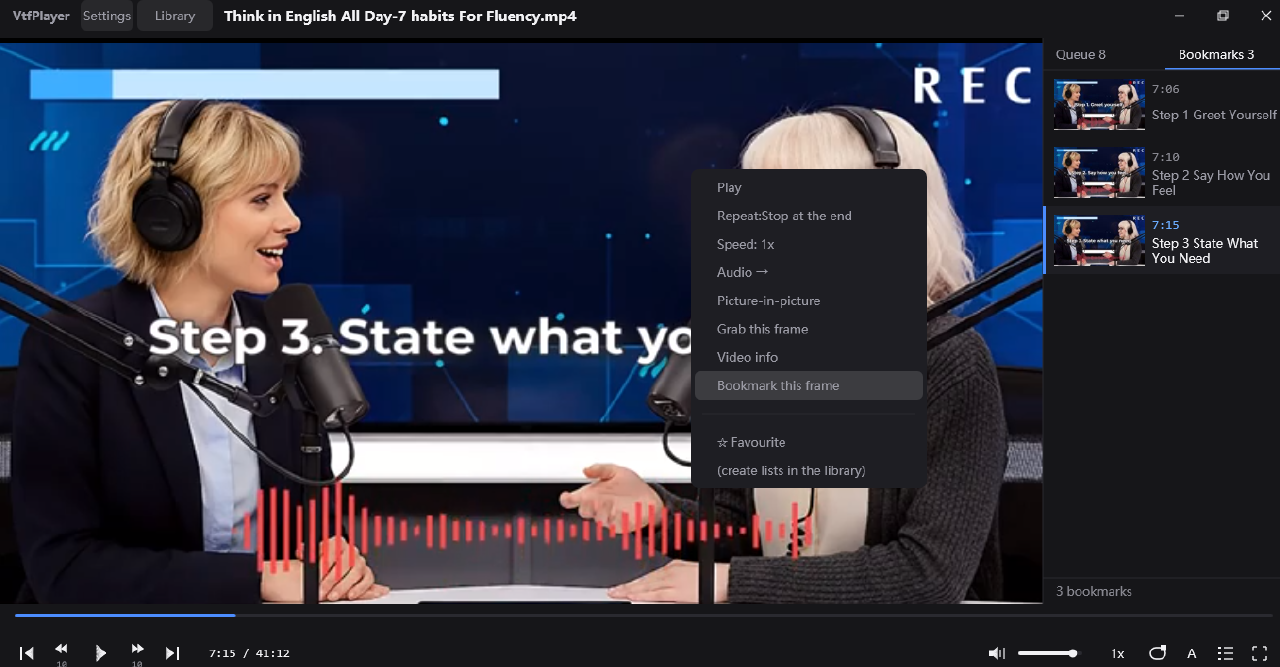
- 1“Bookmark this frame” in the right-click menu. One click and the frame on screen is kept.
- 2The Bookmarks panel, ordered by time. Every entry is the real picture of that frame, and you can name it yourself. Click one and playback jumps there.
The picture, not a timestamp
When you bookmark a frame, that frame's image is written to the local library. Seeking back to a stored timestamp can land a few frames off on variable frame rate or long-GOP video — the picture you remembered may not be there any more.
One click away
The Bookmarks panel sits on the right of the player, next to the queue. Click an entry to jump; right-click to rename or delete it. Come back days later and it is still there.
A contents page per video
Every step of a tutorial, that diagram in a lecture, the goal in a match, the second a line of dialogue lands — keep them, name them, and long videos finally have navigation.
Everything else, and nothing more
Plays everything
MP4 / MKV / AVI / WMV / FLV / MOV / WebM / RMVB / RM / M4V / MPG / MPEG / M2TS / VOB, plus audio files such as MP3. Built on FFmpeg, hardware accelerated.
Media library
Point it at your folders: thumbnails, resume where you left off, favourites, search by name.
Subtitles
Embedded and external tracks, full ASS/SSA styling via libass, and PGS image subtitles.
Playback
Speed control, frame-by-frame stepping, picture-in-picture, a queue you can reorder, saved playlists.
Small
Under 18 MB in total. No runtime, no codec pack and no administrator rights needed.
English · 简体中文 · light and dark
The interface follows your system language, or you can pick one. Light and dark themes.
It never goes online
The bundled FFmpeg is built with --disable-network, and the app itself
contains no networking code at all. No accounts, no ads, no telemetry, no crash reporting.
Your library, your progress and your bookmarked frames stay in one folder on your PC.
%APPDATA%\VtfPlayer\native\